Features

The essentials

And more

Who it's for
PricingAbout

AI assistant for hunting

You ask. Your hunt gets organised.

Mes Chasses connector for ChatGPT and Claude, free. It drafts hunts, prepares invitations and waits for your approval before anything goes out.

Free to startiOS · Android · Web

Your spreadsheets become invitations

Drop your Excel files into ChatGPT or Claude. The assistant finds first name, last name, email and phone, spots duplicates and prepares the invitations.

  • Several files, up to 200 people
  • Duplicates checked in your contacts
  • For a hunt or the territory

Organise it by talking

You write to ChatGPT or Claude. The assistant lists your hunts, creates a draft, prepares invitations and chases replies for you.

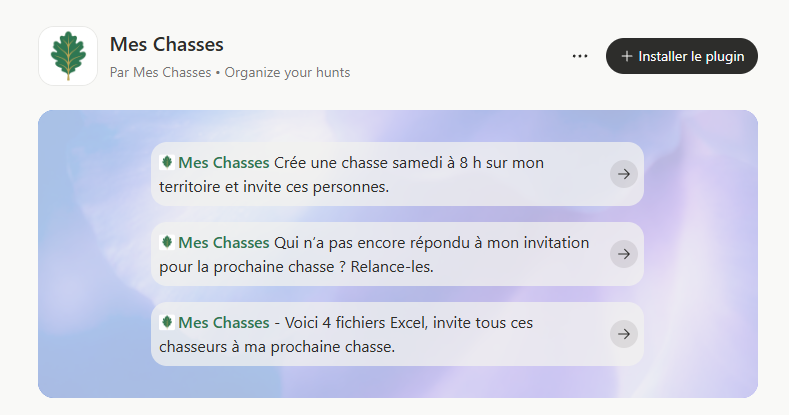
The Mes Chasses page in the ChatGPT directory, with three example requests: create a hunt on Saturday at 8 a.m. and invite these people; who has not replied yet, chase them; here are 4 Excel files, invite all these hunters to my next hunt

Nothing goes out without your say-so

For anything that reaches real people, the assistant first shows a short recap. You say yes, and only then does it send.

  • Invitations, reminders, publishing a draft
  • Your approval stays valid for 15 minutes
  • It never changes a hunt that is already out

Your data stays protected

The assistant works with your own rights and never sees more than Mes Chasses shows you. Contacts come masked.

  • Masked emails and phone numbers
  • No licence, photo, address or birth date
  • One click to cut access, from your profile
Try it for free

Ready to make your hunts simpler?

Join the associations using Mes Chasses. Free to start, no credit card required.

Frequently asked questions

On Claude, open Customize, Connectors, add a custom connector and paste the URL https://mcp.meschasses.com/mcp. On ChatGPT, open the Mes Chasses listing in the apps directory (the "Add to ChatGPT" button at the top of this page) and connect it. You land on a Mes Chasses page to authorise access.
No. Using it requires no subscription and no paid plan. The limits of the hunting ground plan (hunts per month, number of members) apply as in the app. Changing plan happens in the app, not from the assistant.
Emails and phone numbers of people show masked: an email becomes j***@domain.tld, a phone shows only its last two digits. The assistant never receives a licence number, photo, address or date of birth. For licences, it only sees the compliant or not status.
It can list your hunting grounds and your hunts, create a hunting ground, create a draft hunt, publish it (with your approval), invite up to 200 people at a time, see replies and chase them, check licences and chase those with missing papers. It cannot delete, cancel or edit an existing hunt, validate a licence on your behalf, create a payment or change the hunting ground plan.
On the website, open your profile and the "AI assistants connected" section, then click "Revoke". The assistant can no longer do anything on your account. Removing the connector on the Claude or ChatGPT side is not enough: it is the revocation in Mes Chasses that cuts off access.
Gemini is coming soon. For now, Google only opens custom connectors to a small set of users; Mes Chasses is getting ready. In the meantime, Claude and ChatGPT are available.
The assistant first prepares a summary: who will be invited, how many people, what goes out by email. You say yes or you correct the list; only then does it send. Your approval is good for 15 minutes and for one send: after that, or if you change anything, the assistant rebuilds a summary.

Manage less. Hunt more.

Join the associations running their driven hunts with Mes Chasses.

Free to startNo credit cardiOS · Android · Web